Connecting Sonarr & Radarr
Decypharr provides both QBitTorrent and Sabnzbd-compatible APIs for Sonarr, Radarr, and other *Arr applications.
For Torrents/Debrid: QBitTorrent Client
Section titled “For Torrents/Debrid: QBitTorrent Client”In Sonarr/Radarr:
- Go to Settings → Download Clients
- Click + → qBittorrent
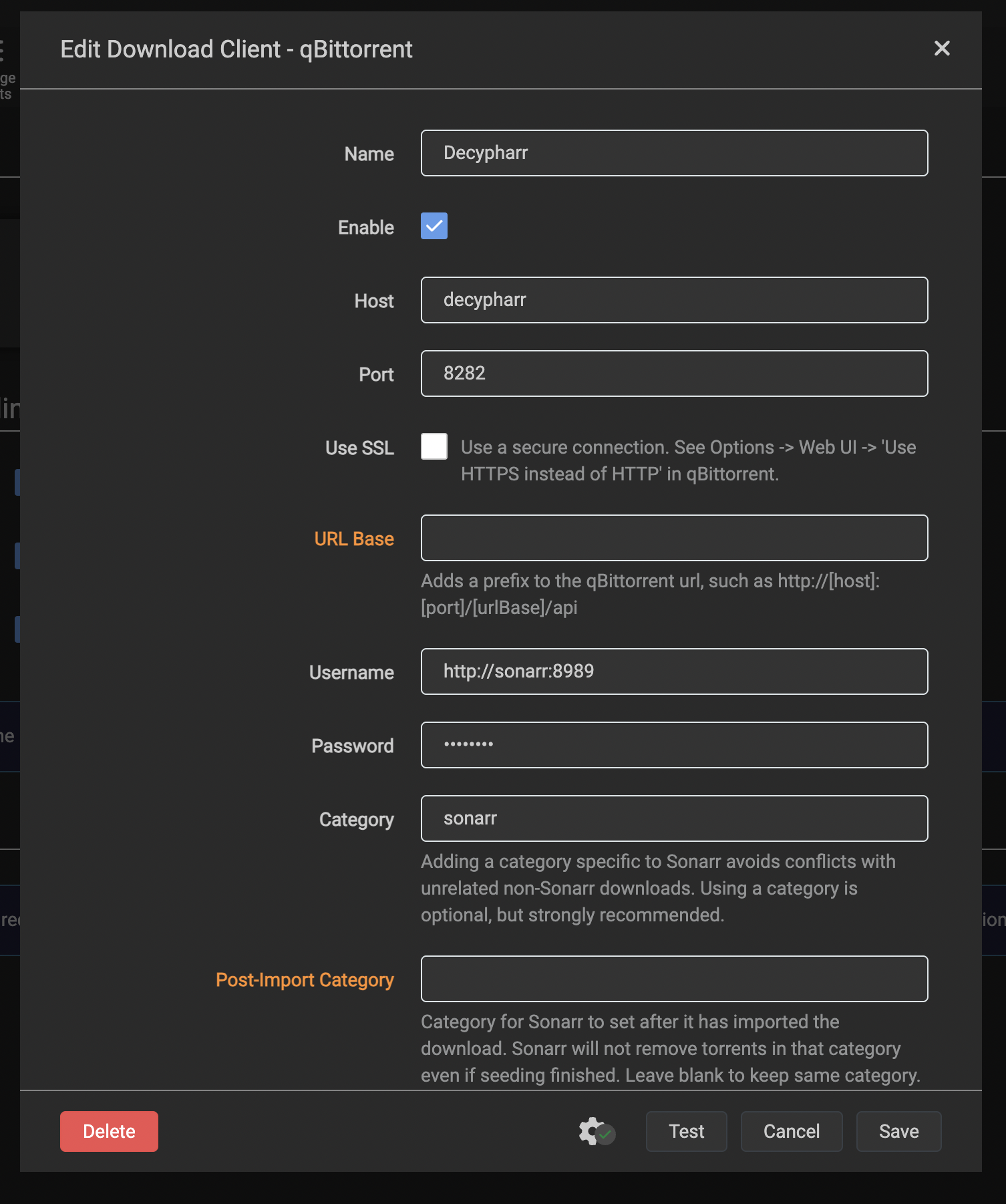
Screenshot: qBittorrent download client configuration.
QBitTorrent Settings
Section titled “QBitTorrent Settings”| Field | Value |
|---|---|
| Name | Decypharr (Torrents) |
| Host | decypharr (or IP) |
| Port | 8282 |
| Username | Arr’s host(http://sonarr:8989) |
| Password | Arr’s token(gotten from Arr’s General -> Token) |
| Category | sonarr / radarr |
| Priority | 0 (Normal) |
Advanced
Section titled “Advanced”Remove Completed: YesRemove Failed: NoClick Test → Save
For Usenet: Sabnzbd Client
Section titled “For Usenet: Sabnzbd Client”If you’ve configured Usenet providers, add a Sabnzbd client:
- Go to Settings → Download Clients
- Click + → Sabnzbd
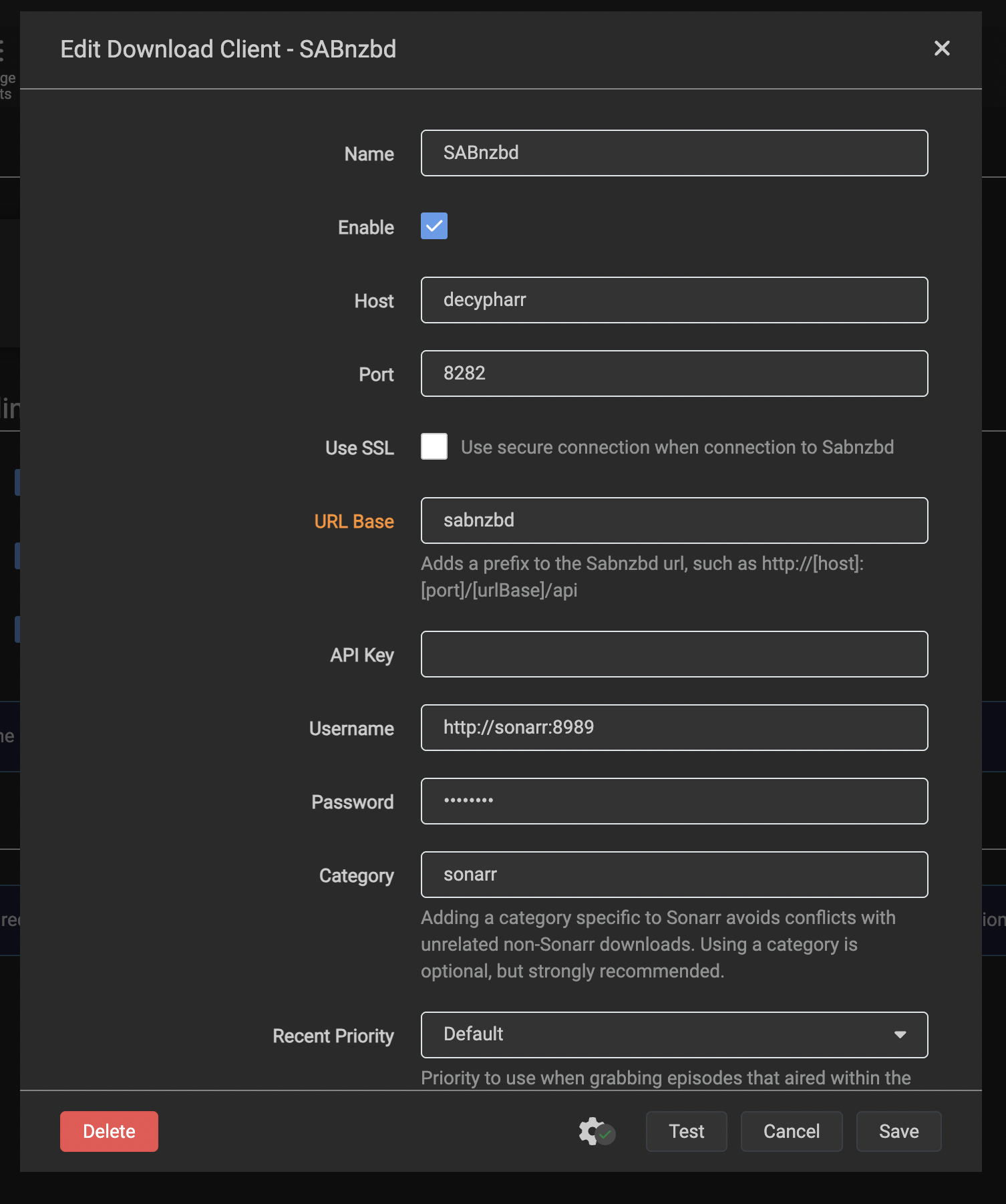
Screenshot: Sabnzbd download client configuration.
Sabnzbd Settings
Section titled “Sabnzbd Settings”| Field | Value |
|---|---|
| Name | Decypharr (Usenet) |
| Host | decypharr (or IP) |
| Port | 8282 |
| URL Base | /sabnzbd |
| Username | Arr’s host(http://sonarr:8989) |
| Password | Arr’s token(gotten from Arr’s General -> Token) |
| Category | sonarr / radarr |
| Priority | 0 (Normal) |
Click Test → Save
Can I use both Debrid and Usenet in same Arr?
Section titled “Can I use both Debrid and Usenet in same Arr?”Yes! See Using Both Torrents and Usenet above.
Add both clients with different priorities to prioritize one source over the other.you prefer one over the other. Arrs will use the higher-priority client first.
Using Both Torrents and Usenet
Section titled “Using Both Torrents and Usenet”You can add both download clients to the same Arr:
- Decypharr (Torrents) - QBitTorrent client
- Decypharr (Usenet) - Sabnzbd client
Set different priorities if you prefer one over the other. Arrs will use the higher-priority client first.
Path Mapping
Section titled “Path Mapping”If your Arr and Decypharr are on different systems, configure path mappings.
Example Setup
Section titled “Example Setup”- Decypharr mount:
/mnt/decypharr - Sonarr sees:
/media/tv
Path Mapping:
Remote Path: /mnt/decypharrLocal Path: /media/tvDownload Actions
Section titled “Download Actions”Decypharr supports multiple download actions configured per-Arr or globally:
| Action | Description |
|---|---|
symlink | Create symlink to mounted file (default) |
download | Download file to local storage |
strm | Create STRM file pointing to WebDAV URL |
none | No action (Arr manages files) |
Set in config.json:
{ "arrs": [ { "name": "Sonarr", "host": "http://sonarr:8989", "token": "ARR_API_KEY", "download_action": "symlink" } ]}Auto-Detection
Section titled “Auto-Detection”Decypharr can auto-detect Arrs that connect to it:
{ "arrs": [ { "name": "Sonarr (Auto)", "host": "http://sonarr:8989", "token": "ARR_API_KEY", "source": "auto" } ]}Check Settings → Arrs in the Web UI to see detected instances.
Troubleshooting
Section titled “Troubleshooting”Test Connection Fails
Section titled “Test Connection Fails”- Verify Decypharr is accessible:
curl http://decypharr:8282/version - Check username/password match config
- Ensure no firewall blocking port 8282
Downloads Not Importing
Section titled “Downloads Not Importing”Check path mapping - Arr must see files at same path structure.
Example (Docker):
services:  decypharr:    volumes:      - /mnt/storage:/mnt/storage  # Same path!
  sonarr:    volumes:      - /mnt/storage:/mnt/storage  # Same path!
Uncached Torrents
Section titled “Uncached Torrents”Enable download_uncached per-Arr:
{ "arrs": [ { "name": "Sonarr", "download_uncached": true } ]}